@mr5iveThou5and whipped up this cheat sheet: mrkunz.com/blog/08_22_2018_VEX_Wrangle_Cheat_Sheet.html
(posting for re-gemming)
@mr5iveThou5and whipped up this cheat sheet: mrkunz.com/blog/08_22_2018_VEX_Wrangle_Cheat_Sheet.html
(posting for re-gemming)
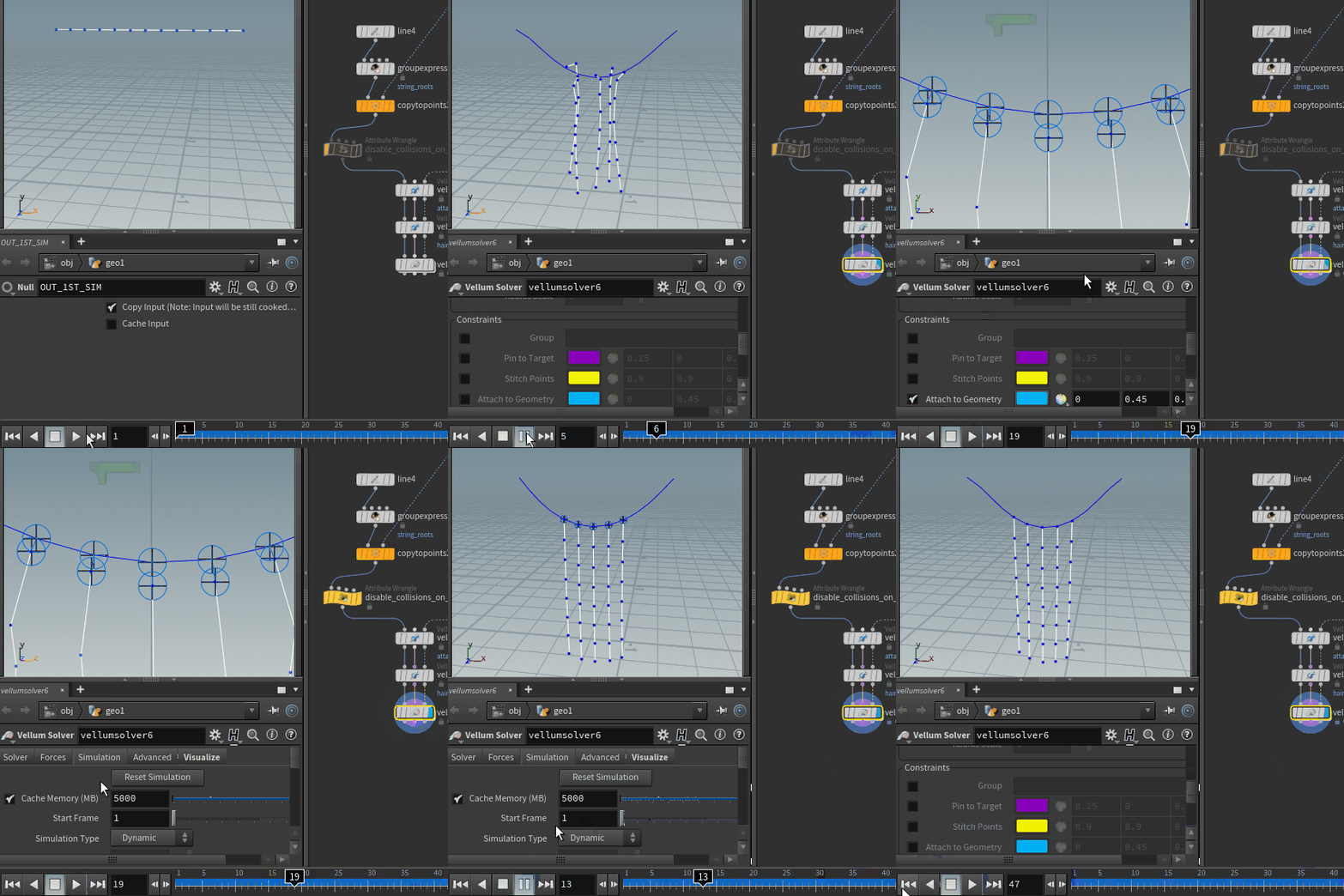
Little trick for those nasty gaps and weird sim behavior in vellum when using attach to geometry constraints. Say you have some vellum sim and want to attach few lines/hairs to it in the second sim (using the first one as collision). There is always a small gap between attached points, and after some time I figured it was due to collisions between those points that is forcing them apart, and causing some weird motion. Easy fix is to just disable collisions on those points that are going to be attached with: `i@disableexternal = 1;` Little GIF that hopefully illustrates things better (or not).
Attachments in this post:
http://fx-td.com/houdiniandchill/wp-content/uploads/discord/20192910/24/19/disable_collision_vellum.gif
if you wan’t ocl to run on the cpu HOUDINI_OCL_DEVICETYPE=CPU it’s in prefs/misc as well now and you can choose a card by name instead of guessing
😉
this is kind of a cool little thing, was working on some sims last night with very visible source volumes that I wasn’t happy with the look of, but also wasn’t happy with how little density was coming into my sim from them either…usually I’d probably try to rework the shapes and crank the density a bunch on the source, but ended up trying something that worked way better:
– go way lower with your source density than you’d normally think to, like 0.05 kind thing – gas wrangle — @density += @temperature * clamp(@density, 0, 1) * chf(“mult”);
now you’ve got a smoke density that’ll grow a bit more after it’s sourced, but in a really natural looking way that doesn’t show your source so badly and will be swirling and advecting while it continues to pump density
Attachments in this post:
http://fx-td.com/houdiniandchill/wp-content/uploads/discord/20193710/02/19/density_growth_v001.mp4
http://fx-td.com/houdiniandchill/wp-content/uploads/discord/20193710/02/19/broom_puff_fx_main_v008_720p.mp4
How xyzdist works :
It uses a Bounding Volume Hierarchy (BVH) data structure, which consists of a tree of boxes. At the top, there’s effectively a bounding box containing everything, at each level, each box splits into 4 (hopefully) smaller boxes, and at the bottom, there’s a box for each primitive, (multiple for some primitives).
First, VEX has to build and cache the BVH. Then, it traverses the tree, visiting boxes that are close to the query point, finding the closest points on primitives in those boxes, and then visiting boxes that are a bit farther, until the closest point in a box is farther than the closest point found so far, and then it exits.
As for individual primitives, it varies, but for a triangle, the BVH caches the triangle’s normal, so if a line on the query point in the direction of the normal intersects the triangle, that’s the closest point on the triangle, and if not, it projects the query point onto each edge to find the closest there, and if those are all out of bounds, it finds the closest corner position to the query point, and that’s the closest point on a triangle.
Thought it’s quite interesting. Above is from the Dev, Neil D
i’m sure this is beneath everyone here, but i wrote up some notes on getting detailed (sorta) smoke sims: www.tokeru.com/cgwiki/index.php?title=SmokeDetailed
sergeneren.com/2019/08/21/creating-low-altitude-clouds/ fun tutorial someone shared at work about modeling clouds using pyrooooooooooooooo
here’s what i was thinking. this would work better using point attributes as the bias instead of just a global bias. this will blend the position and orientation of packed rigid bodies back to their original positions/orientations, during the simulation so collisions are preserved.
Attachments in this post:
http://fx-td.com/houdiniandchill/wp-content/uploads/discord/20191308/15/19/blend_rbd_toadstorm.hiplc
@FourColumns here’s a simple example… i create a uv vector field, add data for it to the DOPs simulation, advect it through the velocity field, then use that UV field to look up a texture in the material
Attachments in this post:
http://fx-td.com/houdiniandchill/wp-content/uploads/discord/20194807/11/19/2d_volume_texture_advection.hip
@Calito @Fogelstrom Shameless plug, there is actually a linux build now! www.mattpuchala.com/pseudoaccelerated