Archived post by flakypastries

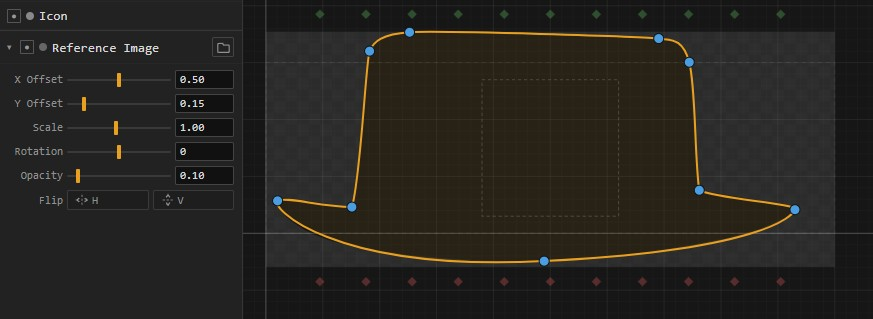
@.goldfarb. @spectralsoda I pushed an update to the NodeShape Designer: tcrowson.github.io/houdini_nodeshape_designer/
– Added angle snapping on ports (shift-drag) – Updated Mirror/Align Icons – Updated Import/Export Icons – Added support for Copy/Paste of points. You’ll get a warning if pasting into a non-empty layer, but it will still paste. – Added Reference Image support (ctrl-MMB on labels to reset params)

I call this one `lets_cook` 😄

it’s super easy for me to add existing stock shapes to the presets list, I just need approval from SideFX since I think that might count as redistribution of content and would be iffy.

Attachments in this post:
http://fx-td.com/houdiniandchill/wp-content/uploads/discord/20264404/30/26/image.png

Archived post by jim.meston

Vellum hair constraint setup is very antisocial so if you plug things in line with it, there’s a good chance it doesn’t do what you expect, either silently or otherwise. Run constraint construction in parallels and then fuse judiciously. In this case there is no branching so it is simple.
This way you can drastically improve compression and stretching and also if you get fancy you can make hybrid torque, stiffness constraints. This is what I do for my Vellum Branch Constraint sop which allows you do setup foliage rigs without collapse or bouncy sim settling.
Here I am getting results with 2 substeps.

Increasing the neighbour distance increase stretch/compression resistance. Same for if set this up with bendtwist hybrid struts.

[edit] Might as well add this here also. We can use decreasing density along the curve to increase stiffness as the per point variable mass changes resistance to acceleration. This appears as increased stiffness. It works but rather than linear density decay, it should likely be pow(width,2) or something with some care not to have infinite or zero values.
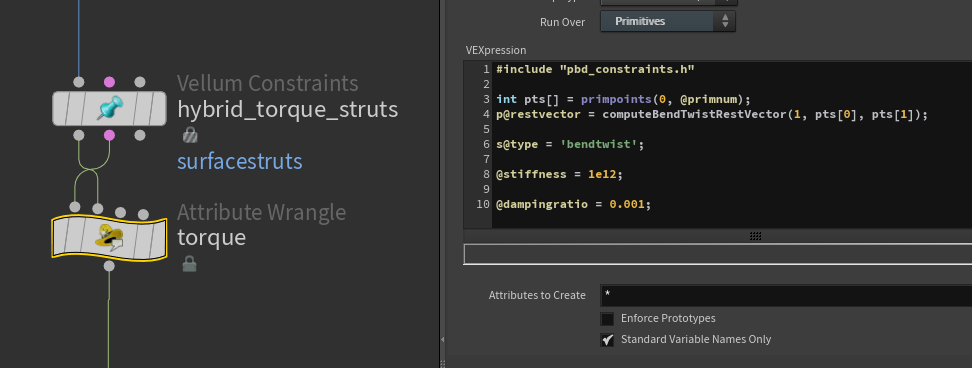
But we can also set up extra fancy bendwist stiffness struts like this. (+ Bad habit setting stiffness to max as it can’t resolve but that’s another subject).

This works very well for situations without high accelerations and high impact collisions, but can cause artifacts. This can be addressed with carefull stiffness / substeps balance. Or you can bodge the rig with a delta mush which almost always works.

Probably a lot more rough and ready than that fancy paper.

For copy paste ease. Note the inputs.
“`js #include “pbd_constraints.h”
s@type = ‘bendtwist’;
int pts[] = primpoints(0, @primnum); p@restvector = computeBendTwistRestVector(1, pts[0], pts[1]);
@stiffness = 1e12; @dampingratio = 0.001; “`

Attachments in this post:
http://fx-td.com/houdiniandchill/wp-content/uploads/discord/20265404/27/26/image.png
Archived post by mysterypancake

it kind of sounds like an audio compressor, it gave me a similar idea to toadstorm you could take the min and max of several neighbours, then blur it, then normalize to that range

like a moving average with a rectangle window except min/max instead (en.wikipedia.org/wiki/Moving_average)

Attachments in this post:
http://fx-td.com/houdiniandchill/wp-content/uploads/discord/20261604/11/26/2026-04-11_14-03-42.mp4
http://fx-td.com/houdiniandchill/wp-content/uploads/discord/20261604/11/26/normalize_windowed.hiplc

Archived post by shadeops

Prior to Houdini 21, when ever you installed an HDA to your hip, `hou.hda.installFile()`, it would internally run the `dsreload` hscript command which rebuilt all the shelves and toolbars. Which for one HDA isn’t expensive. But this would happen for every HDA installed, and the more HDAs you installed the longer it would take. So they added a hou.hda.installFiles() as a way to batch it, which triggers a single `dsreload` at the very end. Internally when loading a hip the same thing would happen, so they changed the hip file loading to batch load them as well.