Archived post by waffleboytom

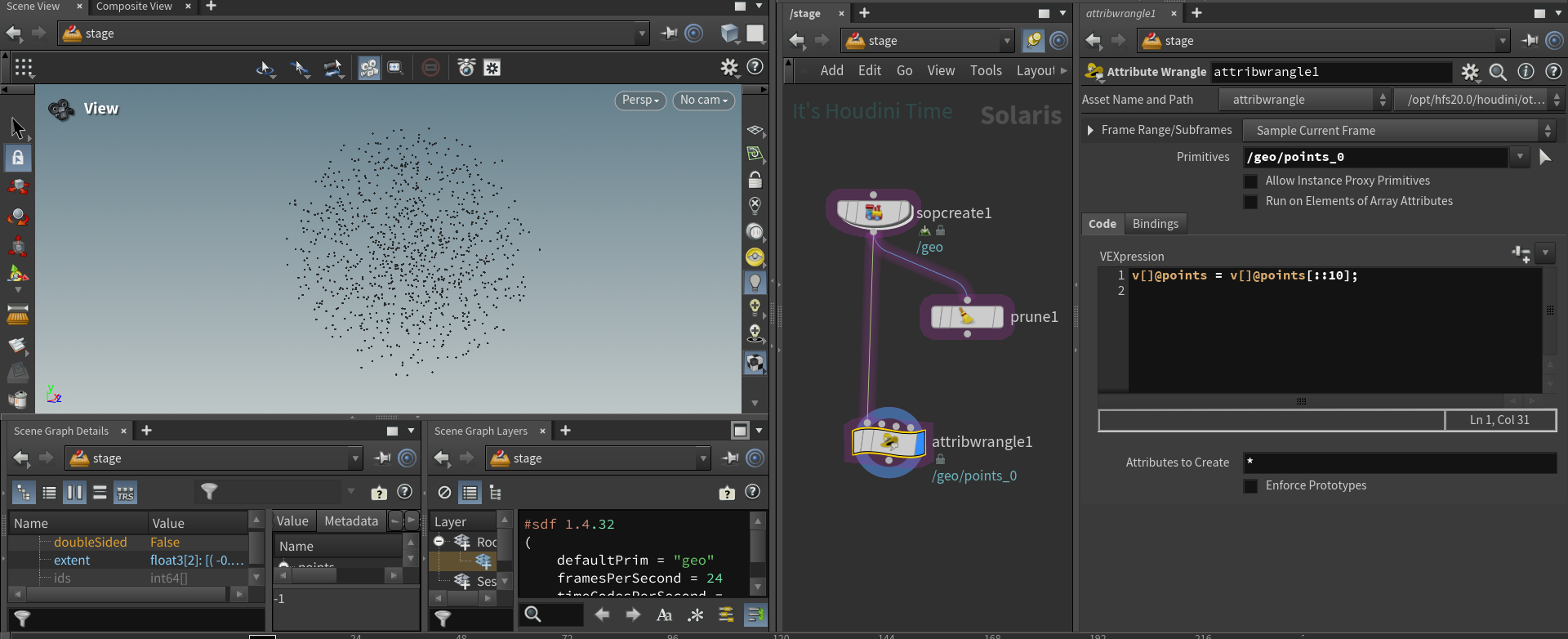
this works but I feel like it’s a hack

“`py node = hou.pwd() stage = node.editableStage()
prim = stage.GetPrimAtPath(‘/geo/points_0’)
ptsattrib = prim.GetAttribute(‘points’)
ptsarray = prim.GetAttribute(‘points’).Get()
ptsattrib.Set(ptsarray[::10]) “` weirdly enough the python version doesn’t seem to affect the HoudiniDataId while the vex version sets it to -1 which makes me go hmmmmm

“`py node = hou.pwd() stage = node.editableStage()
prim = stage.GetPrimAtPath(‘/geo/points_0’)
attribs = prim.GetAttributes()
for attrib in attribs:
interp = attrib.GetMetadata(“interpolation”)
if interp == “vertex”:
valarray = attrib.Get() attrib.Set(valarray[::10]) “` this makes more sense as if you have more primvars on your points you would wanna slice those arrays as well

the 10 here drives the percentage of points you want, setting it to 10 gives me 10 percent of my original pointcount

to get 5% you would do 20 because 100/20

“`py node = hou.pwd() stage = node.editableStage()
for prim in stage.Traverse():
if not prim.GetTypeName() == ‘Points’:
continue
attribs = prim.GetAttributes()
for attrib in attribs:
interp = attrib.GetMetadata(“interpolation”)
if interp == “vertex”:
valarray = attrib.Get() attrib.Set(valarray[::10]) “` here’s a version that will cull all your point clouds to keep only 10%. Might be slow if you have a large stage as I’m doing a stage traversal here

this won’t work for an animated pointcloud though

hold on

right, here’s a file with a static point cloud, animated(time dependent), animated(time samples)

Attachments in this post:
http://fx-td.com/houdiniandchill/wp-content/uploads/discord/20245502/17/24/image.png
http://fx-td.com/houdiniandchill/wp-content/uploads/discord/20245502/17/24/waffles_cull_points_solaris.hip
Archived post by waffleboytom

I’ll post the code in a bit

“`py from pxr import UsdSkel
node = hou.pwd() stage = node.editableStage()
skeleton_prim = None anim_prim = None
for prim in stage.Traverse() :
if prim.GetTypeName() == “Skeleton”:
skeleton_prim = prim
elif prim.GetTypeName() == “SkelAnimation”:
anim_prim = prim
anim_binding = UsdSkel.BindingAPI.Apply(skeleton_prim.GetPrim())
anim_rel = anim_binding.CreateAnimationSourceRel()
anim_rel.AddTarget(anim_prim.GetPrim().GetPath())
vis = skeleton_prim.GetAttribute(“visibility”)
vis.Set(“invisible”)“`

Here’s my file featuring all methods we discussed (you need the dragon and the shark models )

(that snippet also hides the skeleton so it doesn’t show on the dragon)

Attachments in this post:
http://fx-td.com/houdiniandchill/wp-content/uploads/discord/20240002/13/24/waffles_usd_apply_anim.hip

Archived post by waffleboytom

the classic “I found code on the forum” haha “`py
node = hou.pwd() stage = node.editableStage()
from pxr import UsdSkel
skeleton_prim = stage.GetPrimAtPath(“/Object_10/skin0/skeleton”)
anim_binding = UsdSkel.BindingAPI.Apply(skeleton_prim.GetPrim())
anim_rel = anim_binding.CreateAnimationSourceRel()
anim_prim = stage.GetPrimAtPath(“/Object_10/skin0/Scene”) anim_rel.AddTarget(anim_prim.GetPrim().GetPath()) “`

Archived post by petercubic

hey there, I meant to post this earlier but got caught up in a long meeting; I think another Peter gave you the tip you needed though 😁 🙌
One other way of doing this is creating a sort of “Uber-Shader” using Parameter Nodes when building shaders. This creates an “Input” within USD, and allows for you to use the Edit Material Property LOP to make as many Specializes (a type of Reference) from one shader as you want. I learned this from @goldleaf, and hopefully I’m explaining it decently.
Here’s a quick example HIP I whipped up. Might not be the best example, but hopefully it makes it clear enough. One of the shaders should be offsetting more quickly than the other.
Let me know if I can try to help clarify anything more. 🙂

Attachments in this post:
http://fx-td.com/houdiniandchill/wp-content/uploads/discord/20243401/31/24/Animated_Shader_Properties.hip