idk about “simple” but i used to do this workaround 😬 https://lewisinthelandofmachines.tumblr.com/post/176559578118/houdini-per-piece-cryptomatte-mantra-support-for
Archived post by TOADSTORM
okay, first draft is up. feel free to tell me how wrong i am
Archived post by Sepu
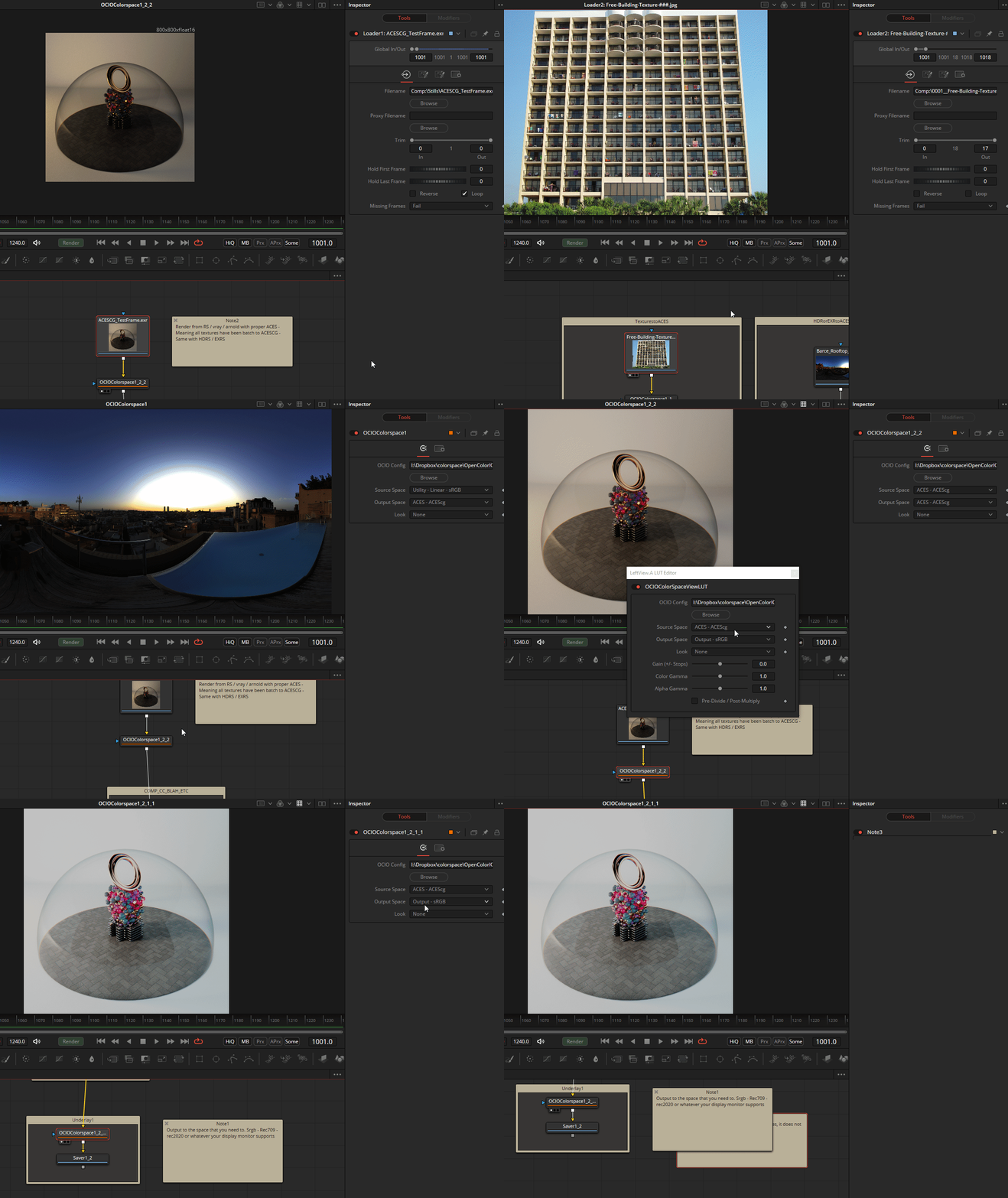
Yep Fusion relies on Viewers – here is fusion comp on how I go about it getting ACES to work when rendering from Houdini / RS if that helps.
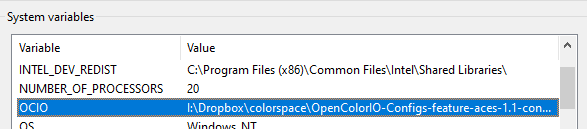
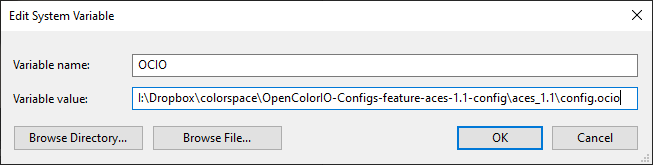
I also set up my OCIO variable in my env system so you do not have load it all the time at least in FUsion which is annoying – Also it keep consistency through out the different DCCs.
this should work with all apps that can read OCIO – Houdini/ Maya / Fusion / Nuke – etc
If you see anything wrong – let me know 🍻
Attachments in this post:
http://fx-td.com/houdiniandchill/wp-content/uploads/discord/20204002/22/20/Archive_Composition.zip
http://fx-td.com/houdiniandchill/wp-content/uploads/discord/20204002/22/20/o5F89fi7nP.gif
http://fx-td.com/houdiniandchill/wp-content/uploads/discord/20204002/22/20/SystemPropertiesAdvanced_KP5Lli9WCg.png
http://fx-td.com/houdiniandchill/wp-content/uploads/discord/20204002/22/20/SystemPropertiesAdvanced_V1Q0BCJKEB.png
Archived post by Sepu
then you can render instances procedurally in Arnold
if you want to render in other engines you gotta use a replicator but that defeats the point of procedural – until they get an SDK out, you gotta use arnold for that matter
you gotta use this guy in Houdini to output the pts correctly
and write them as .vdb
the .hip just in case
Attachments in this post:
http://fx-td.com/houdiniandchill/wp-content/uploads/discord/20201902/20/20/maya.gif
http://fx-td.com/houdiniandchill/wp-content/uploads/discord/20201902/20/20/maya_Ik2V30mFRU.png
http://fx-td.com/houdiniandchill/wp-content/uploads/discord/20201902/20/20/PTS_FROM_HOUDINI_v002.ma
http://fx-td.com/houdiniandchill/wp-content/uploads/discord/20201902/20/20/maya_VIAgt6q6BE.png
http://fx-td.com/houdiniandchill/wp-content/uploads/discord/20201902/20/20/houdini_GNjsPecs8i.png
http://fx-td.com/houdiniandchill/wp-content/uploads/discord/20201902/20/20/PtsToMaya.hip


Archived post by lcrs
i’ve done it in the past just w/ timeshifts to get previous and next frames, vdb combine all three, chuck a vdb renormalize sdf afterwards for luck
in fact i’ve done this with as many as 7 frames 😬 it does help but there will be some oversmoothing damage. i think i remember getting better results with the A multiplier in the combine at 1.0, even though you might think 1/3.0 would be approriate 🤔 having extra interior and exterior bands was worth it
Archived post by shadesoforange
@Glad-Partikel if your vdb is really low res you can try this: www.patreon.com/posts/handy-scrap-vdb-26790042
also by @pdohorse
i found that it doesn’t work with high res vdbs though
Archived post by shadesoforange
@mestela I have this code lying around for copying parm values from one node to another
(from the first selected node to the second)
“`def copyParmValues(source_node, target_node): “”” Copy parameter values of the source node to those of the target node if a parameter with the same name exists. “”” for parm_to_copy in source_node.parms(): parm_template = parm_to_copy.parmTemplate() # Skip folder parms. if isinstance(parm_template, hou.FolderSetParmTemplate): continue
parm_to_copy_to = target_node.parm(parm_to_copy.name()) # If the parameter on the target node does not exist, skip this parm. if parm_to_copy_to is None: continue
# If we have keys/expressions we need to copy them all. if parm_to_copy.keyframes(): # Copy all hou.Keyframe objects. for key in parm_to_copy.keyframes(): parm_to_copy_to.setKeyframe(key) else: # If the parameter is a string copy the raw string. if isinstance(parm_template, hou.StringParmTemplate): parm_to_copy_to.set(parm_to_copy.unexpandedString()) # Copy the raw value. else: parm_to_copy_to.set(parm_to_copy.eval())
#initial setup srcpath = hou.selectedNodes()[0].path() targetpath = hou.selectedNodes()[1].path()
#src and target definition srcNode = hou.node(srcpath) targetNode = hou.node(targetpath)
#copyparms copyParmValues(srcNode,targetNode)“`
Archived post by trzanko
someone like slipowski could probs answer that off the cuff
theorangeduck.com/page/avoiding-shader-conditionals
this a resource he pointed me to once
interesting stuff
Archived post by trzanko
@Jonesy re ur volume question, toad is correct but u can get a lil bit o speed out of @density *= fit( @P.y, 0, .00001, 0, 1);
especially if they big boys
volumes dont looove conditionals
Archived post by JeffLMnT
@xcaseyx here a sparse setup that mixes the colors as well
@kevbot9000 what if you do a vdb deavtivate at the last setup
Attachments in this post:
http://fx-td.com/houdiniandchill/wp-content/uploads/discord/20202602/10/20/color_smoke_sop_pyro_MIX.hiplc