“` How to deal with Iterations: Substeps – More expensive, but gives a better solve – especially for higher stiffness values Constraint Iterations – Increase for higher stiffness value to control excessive deformations – great for cheaper solver at high resolutions Smoothing Iterations – smoothing ops, to smooth out errors of excessive deformations, or constraint errors Collision Iterations – Uses the Detangle sop – lower frequency iterations – complicated and time consuming – increase when collisions are fighting against constraints or other collisions However, its probably better to increase substeps and decrease constraint iterations for a more accurate solve – and to reduce load on the constraints – but is more expensive “`
Archived post by Bender
From @trzanko ray sop or prim uv’s don’t yield super great accuracy, as it only interpolates among a primitive’s points, to get a smooth position you can leverage the osd vex functions
here’s my subdiv ray snippet which illustrates this, you can see the diff between the osd pos and the primuv pos if you comment out the line which declares the variable sDP
“`int primNum; vector UV;
float dist = xyzdist( 1, @P, primNum, UV);
vector restN = primuv(1,”N”,primNum,UV); vector posOnRest = primuv(1,”P”,primNum,UV);
//subdiv float pU, pV; int pId; int patch = osd_lookuppatch( 1, primNum, UV.x, UV.y, pId, pU, pV);
//these two functions return the last argument //so posOnRest is being overwritten in the function, much like xyzdist() int sDN = osd_limitsurface( 1, ‘N’, pId, pU, pV, restN); int sDP = osd_limitsurface( 1, ‘P’, pId, pU, pV, posOnRest);
@P = posOnRest;“`
posting Tighe’s post for re-gemming
Archived post by Bender
@mr5iveThou5and whipped up this cheat sheet: mrkunz.com/blog/08_22_2018_VEX_Wrangle_Cheat_Sheet.html
(posting for re-gemming)
Archived post by nicholas ralabate
oh it looks like control-clicking in the color palette sets the permanent default color of a node, no python needed!
Archived post by Sasa Budimir
Little trick for those nasty gaps and weird sim behavior in vellum when using attach to geometry constraints. Say you have some vellum sim and want to attach few lines/hairs to it in the second sim (using the first one as collision). There is always a small gap between attached points, and after some time I figured it was due to collisions between those points that is forcing them apart, and causing some weird motion. Easy fix is to just disable collisions on those points that are going to be attached with: `i@disableexternal = 1;` Little GIF that hopefully illustrates things better (or not).
Attachments in this post:
http://fx-td.com/houdiniandchill/wp-content/uploads/discord/20192910/24/19/disable_collision_vellum.gif
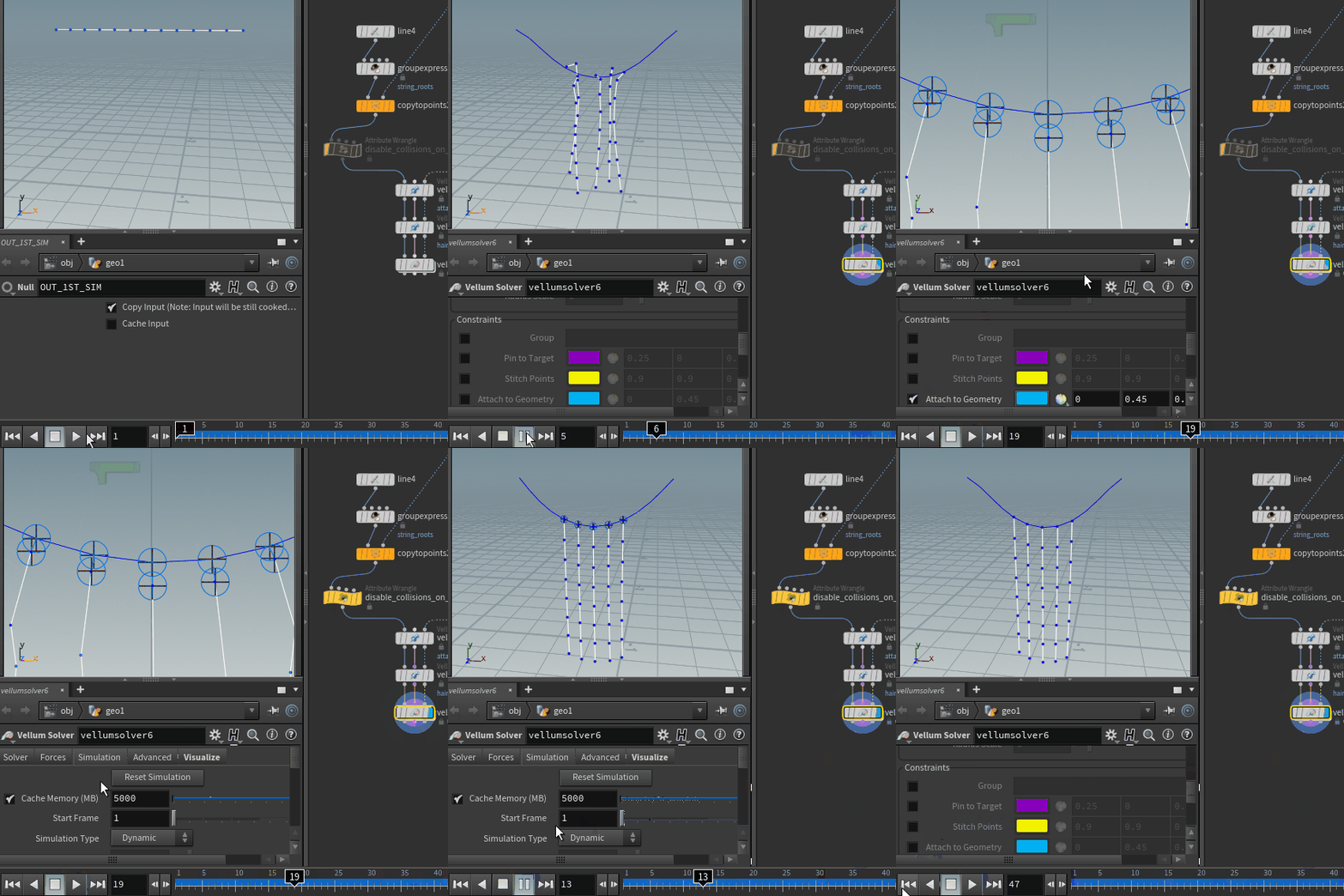
Archived post by davebr
forums.odforce.net/topic/31435-smoke-solver-tips-and-tricks/
eat jay’s delicious brains there
i mean learn from jay there
Archived post by SniperJake945
if you’re too lazy to search 😛
this is that shit but on surfaces. I cant release the code for this unfortunately but it works on most if not all non degenerate triangle meshes 😮 the tracing methods are based off that keenan paper i posted in cgi-math about intrinsic triangulations 😮
will pump out some longer versions laterrr
gotta actually do work at some point today 😦
but if u dont want to do crazy surface tracing, you can just fake it with xyz dist and primuv, though itll be pretty slow for big meshes like this (100k points)
Attachments in this post:
http://fx-td.com/houdiniandchill/wp-content/uploads/discord/20190510/22/19/jr_physarum_revisited_reupload.hipnc
http://fx-td.com/houdiniandchill/wp-content/uploads/discord/20190510/22/19/jr_surface_physarum_v001.mp4
Archived post by sonofkilldozer
lol… yah good luck with that. 578 pages of flickr photos
not tagged properly
took me like a few weeks to go through it all
because there are a lot of on earth or unrelated to iss or hubble imges
Archived post by goldfarb
if you wan’t ocl to run on the cpu HOUDINI_OCL_DEVICETYPE=CPU it’s in prefs/misc as well now and you can choose a card by name instead of guessing
😉
Archived post by lcrs
discovered a hilarious baking gotcha that should be documented for future searchers of discord – the bake texture ROP does border expansion or diffuse fill to cover the black gaps between UV islands, but it silently fails if you have a background image enabled on the camera node the ROP is set to. only took about 2 hours to figure out <:goose:418150131272122368>