@NickTaylor @jake rice 😮 Here are my 10 easy steps to get HDK (h17) compiling on windows 10! Before we start let me just says its 1 step on linux and mac… Also if anyone knows a better way please tell me… Anyway…. Step 1. Download Cgwin64 (bash for windows) you will need this to compile with hcustom. Step 2. h17 is compiled using VC v141. (It actually tells right in the name of the Houdini download .exe) so you will need to download visual studios and visual studios installer 2017 and download the C++ components. Step 3. Check that you actually have the files at the directory path “C:Program Files (x86)Microsoft Visual Studio2017CommunityVC” Step 3: Launch a Cgwin64 shell. Step 4. cd into your Houdini installation directory. (your build might be a different version) cd “C:Program FilesSide Effects SoftwareHoudini 17.0.352” Step 5. Source the Houdini environment. source houdini_setup Step 6. Create a MSVCDir env variable so Houdini knows where to look for the C++ components. (Your exact version may be different so make sure you check in the ”MSVC” directory) export MSVCDir=”C:Program Files (x86)Microsoft Visual Studio2017CommunityVCToolsMSVC14.16.27023” Step 7. cd into the directory your code is in. Step 8. After like 8 hour of fiddling, and if you haven’t lost the will to live, finally compile your code! hcustom.exe file.h file.cpp Step 9. Move your plugin from the Cgwin64 environment to your regular windows environment. cp “C:/cygwin64/home/USERNAME~1/houdini17.0/dsomyPlugin.dll” “C:UsersUSERNAMEDocumentshoudini17.0dso” Step 10. Launch Houdini normally and use your plug-in!
Category: hou-programming
Archived post by Antidistinctlyminty
@mestela You can get hou in a regular Python shell
On windows you have to set the `HFS` environment variable
I have a script that I run via an `import`
“`python ”’Set up the environment so that “import hou” works.”’ import sys, os
# Importing hou will load in Houdini’s libraries and initialize Houdini. # In turn, Houdini will load any HDK extensions written in C++. These # extensions need to link against Houdini’s libraries, so we need to # make sure that the symbols from Houdini’s libraries are visible to # other libraries that Houdini loads. So, we adjust Python’s dlopen # flags before importing hou.
# This needs to be set previous to calling the script hfs = os.environ[‘hfs’]
if hasattr(sys, “setdlopenflags”): old_dlopen_flags = sys.getdlopenflags() import DLFCN sys.setdlopenflags(old_dlopen_flags | DLFCN.RTLD_GLOBAL)
try: import hou except ImportError: # Add $HFS/houdini/python2.7libs to sys.path so Python can find the # hou module. os.environ[‘path’] = ‘{};{}\bin’.format(os.environ[‘path’], hfs) sys.path.append(os.path.join(hfs, ‘houdini’, ‘python2.7libs’)) import hou finally: if hasattr(sys, “setdlopenflags”): sys.setdlopenflags(old_dlopen_flags)“`
Archived post by jake rice
Everything I post is a god damn gem
Archived post by jake rice
this is neat, in H17 they added the cute lil function: `polyneighbours()` so you scrubs dont have to use half edges anymore
Archived post by legomyrstan
`hou.Node.type().name()` returns name of type of given node
best way to find all instances of given node it’s hou.NodeType instances
so eg to find all instances of mantra node: “`python hou.nodeType(hou.ropNodeTypeCategory(), ‘ifd’).instances() “`
other useful thing about searching nodes is that we have access to build in search framework(one that appears after ctr+f)
it’s in the packages called nodesearch at `$HFS/houdini/python2.7libs/nodesearch`
Archived post by will
@mstarktv
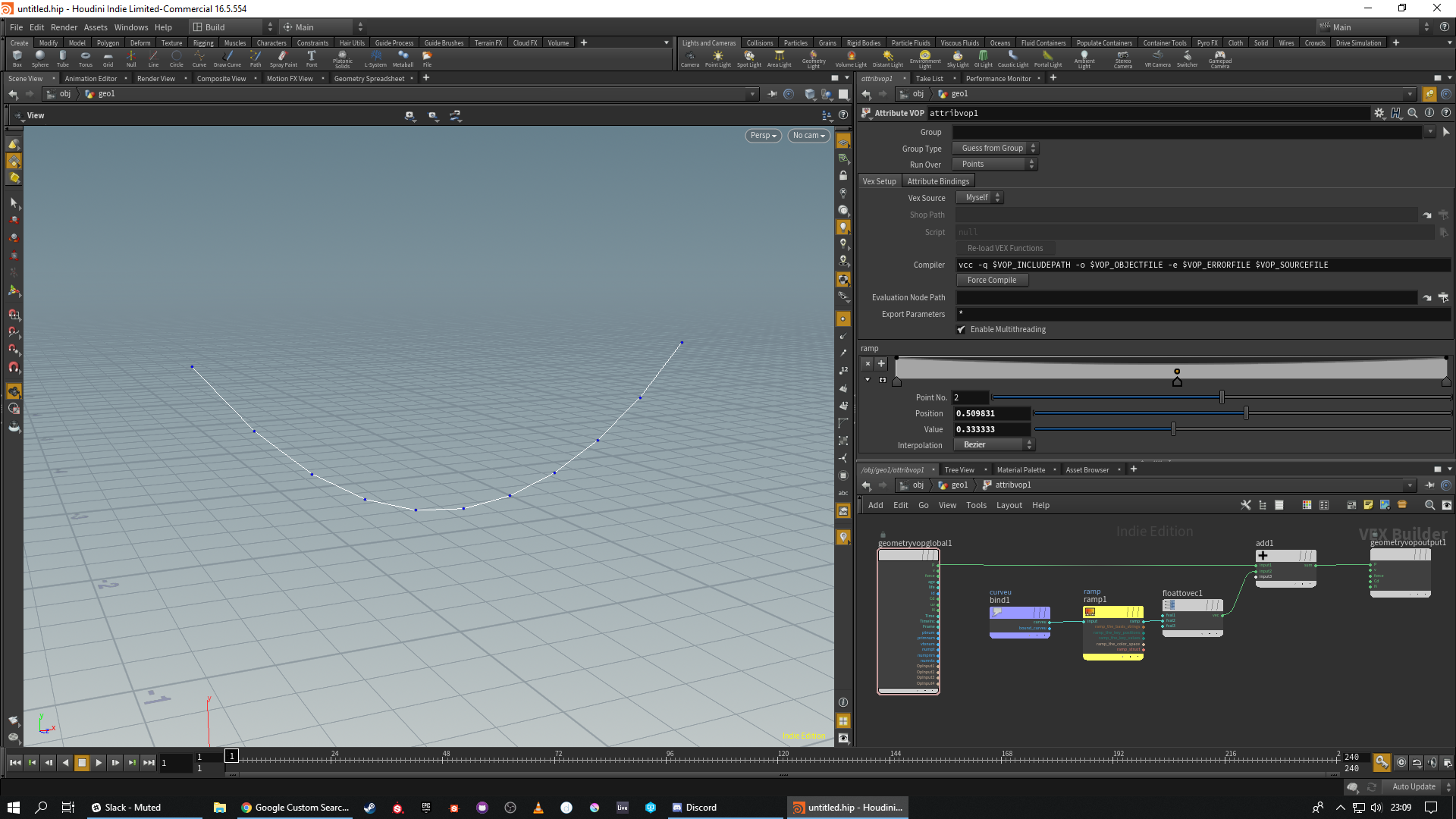
what a cool way to do curve sag:) thanks for the idea
i used to do a three point curve, move the middle point (point 1) down with a transform, and then do a convert to nurbs and resample. This however has a lot fewer steps
funnnn
the hip file if someone wants it
Attachments in this post:
http://fx-td.com/houdiniandchill/wp-content/uploads/discord/20183709/10/18/unknown.png
http://fx-td.com/houdiniandchill/wp-content/uploads/discord/20183709/10/18/curveu_fun.mov
http://fx-td.com/houdiniandchill/wp-content/uploads/discord/20183709/10/18/curveu.hiplc
Archived post by TOADSTORM
or use the binding options in the second tab of the wrangle
you can refer to a generic “myAttrib” in your code, but bind it based on a variable defined with `chs(“attribName”)`
Archived post by Juraj
jtomori.github.io/houdini_additional_python_docs/
documentation of most of houdini python modules
more info: github.com/jtomori/houdini_additional_python_docs/
Archived post by mestela
cool, let us know what you find
in other news, finally finished this:
Archived post by Atom
Yon recently posted a link to a .rar file with example models for destruction practice. A few of them contained a bunch of related texture maps referenced by a .mtl file.
I wrote a short script that will read the .mtl file and create a Redshift material with a *rsTextureMap* populated with the associated map for that material. It is a quick way to get a bunch of materials generated that are related to the model.
You can check it out at this link if you are a Redshift user. forums.odforce.net/topic/32900-mtl-to-redshift-material/
Attachments in this post:
http://fx-td.com/houdiniandchill/wp-content/uploads/discord/20184702/26/18/untitled-1.jpg