One thing I neglected to mention in that post is xyzdist and mindist both require primitives in the geo stream you’re looking up
So they aren’t totally apples to apples with nearpoints/pcfind
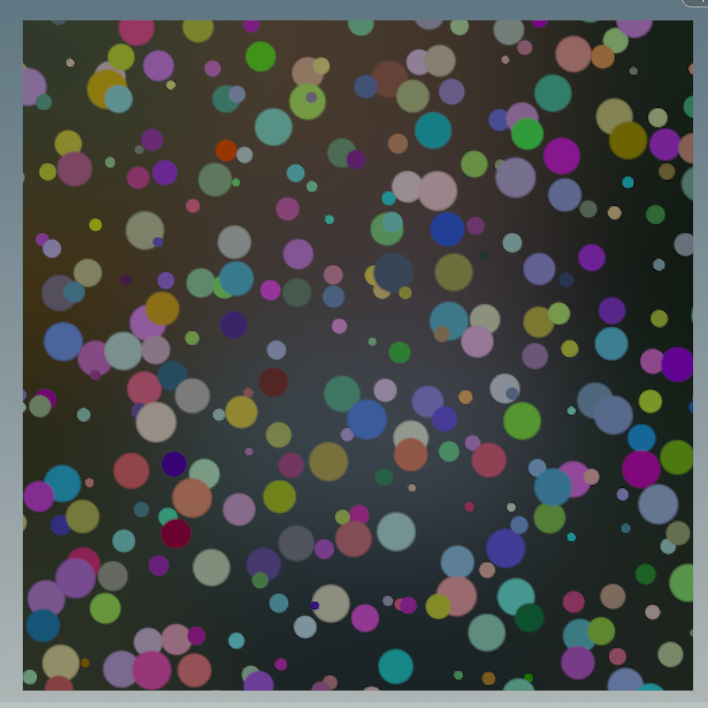
okay i couldnt help myself, but here’s single pass random overlapping dots “`c #include #include
vector dots(vector2 uv_in; vector2 freq; float rand_position, rand_scaling, rand_exp, dot_sharpness, alpha_out){ vector2 uv = uv_in; uv *= freq; vector2 iuv = floor(uv); vector2 grid = frac(uv); float alpha = 0; vector color = 0; float sharpness = fit(dot_sharpness, 0, 1, .5, 1); for(int i = -1; i <= 1; i++) for(int j = -1; j <= 1; j++){ vector2 nb_pixel = set(i, j); vector2 nb_offset = vector2(rand(iuv + nb_pixel + 324)) * clamp(rand_position, 0, 1); //random positional offsetting vector nb_color = vector(rand(iuv + nb_pixel + 64)); float nb_dot_size = pow(fit01(rand(iuv + nb_pixel), max(1 - rand_scaling,0), 1), rand_exp); //random scaling float nb_dots = length(nb_pixel + nb_offset - grid) - nb_dot_size; nb_dots = -min(0.0, nb_dots / nb_dot_size); //convert from distance field to dot nb_dots = smooth(1. - sharpness, sharpness, nb_dots); //sharpening the dots vop_composite("AoverB", color, alpha, nb_color * nb_dots, nb_dots, color, alpha); } alpha_out = alpha; return color; }
vector2 uv = set(v@uv.x,v@uv.y); float sharpness = ch(“sharpness”); vector2 freq = chu(“dot_freq”); float random_dot_scaling = ch(“rand_scaling”); float random_exponent = ch(“rand_exponent”); vector2 offset = vector2(chu(“offset”)); float rand_offset = ch(“rand_dot_offset”); float dots_alpha; vector random_dots = dots(uv + offset / freq, freq, rand_offset, random_dot_scaling, random_exponent, sharpness, dots_alpha);
/* comp dots over incoming color*/ float alpha_out = 0; vop_composite(“AoverB”, v@Cd, alpha_out, random_dots, dots_alpha, v@Cd, 1); “`
Attachments in this post:
http://fx-td.com/houdiniandchill/wp-content/uploads/discord/20224804/14/22/unknown.png