Archived post by JeffLMnT
Hahaha this is a direct copy of the answer Omar gave me when I asked the chances of overshoot when intégrating that function
As for a question whether it will overshoot, It will not as it uses an exponential integrator with the assumption that p and A are static through the timestep: `A(t) = G + (A(0) – G) * e^(-pt)` the pull operation ends up evaluating the `A(t)` `A(0)` would be the current value of the field `G` is the current value of the source `p` is the strength Finally, `t` we are evaluating at is `TimeInc` For `t>0` and `p>0` (which is certainly the case), we can see that `0 < e^(-pt) < 1` , which entails that A(t) will be between A(0) and G
Archived post by Dave Stewart
Had a little time this eve to fix some shit and add standard collisions back in
Tidied it up if anyone wants to have a play, probably better ways to set this up but it’s not horribly convoluted (at least by my questionable standards 😂 )
Attachments in this post:
http://fx-td.com/houdiniandchill/wp-content/uploads/discord/20224301/12/22/DStewart_FLIP_WindTunnel_FromSmokeSolver_08.mp4
http://fx-td.com/houdiniandchill/wp-content/uploads/discord/20224301/12/22/DStewart_FLIP_WindTunnel_FromSmokeSolver_08.hip
Archived post by lewis.taylor
don’t forget Ben’s rad presentation!
Archived post by rokandic
You could use the kinefx library “` #include
int ancestors[] = getancestors(0,@ptnum,-1); int root = ancestors[-1]; s@root_path = point(0,”path”,root); “`
Archived post by SniperJake945
https://twitter.com/TearsOfJake/status/1469424765215526913 ayooo i posted up a hip file showing off optimal transport using opencl 🙂 in this case im using optimal transport to find pairings between points in different point clouds.
Archived post by lewis.taylor
no other engine can do it, so points for that
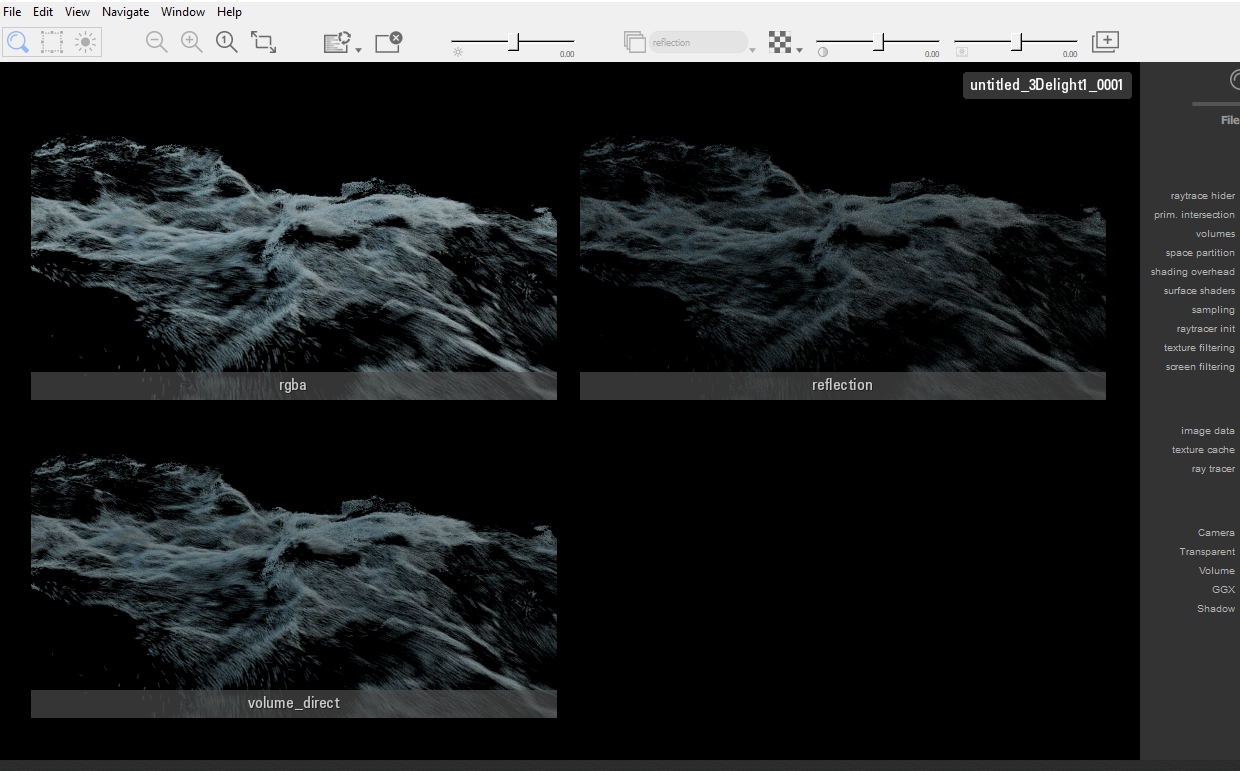
@tokyomegaplex I’ve been doing this a lot lately
it is a principled shader with no base color, high spec, and low opacity
and a volume rasterizer
you get spec hits, and the white volume look
you’d be able to pump up the spec in comp, this just uses the whitewater particles as is
Attachments in this post:
http://fx-td.com/houdiniandchill/wp-content/uploads/discord/20212811/11/21/unknown.png
Archived post by JeffLMnT
@nicholas ralabate @jake rice 😮 This is a really stupid example, but it demonstrates the technique nonetheless
Sorry, my discord notifications were off – so I didn’t see this until I switched on my computer
I’m using a complied block in a sop solver and processing both geometry and constraints in the same step – and they work in tandem 🙂
Attachments in this post:
http://fx-td.com/houdiniandchill/wp-content/uploads/discord/20212110/18/21/jmp_rbd_constraints_geo_block.hip
Archived post by Sepu
is open source which is awesome
Archived post by Atom
@art3mis I put together some simple python scripting examples for fetching image assets into the Unreal Editor and connecting them to a material. forums.unrealengine.com/t/solved-import-alembic-and-assign-material/240088 forums.unrealengine.com/t/solved-connect-a-texture-to-a-material/151392 forums.unrealengine.com/t/solved-folder-to-sequencer/152330 forums.unrealengine.com/t/solved-images-as-planes-for-unreal/152292