make a proxy of the first instance and plug that into the second?
this was posted over in cgwiki discord, but the color theory page is a good enough read that im posting here. chrisbrejon.com/cg-cinematography/chapter-2-color-theory/
make a proxy of the first instance and plug that into the second?
this was posted over in cgwiki discord, but the color theory page is a good enough read that im posting here. chrisbrejon.com/cg-cinematography/chapter-2-color-theory/
discovered a hilarious baking gotcha that should be documented for future searchers of discord – the bake texture ROP does border expansion or diffuse fill to cover the black gaps between UV islands, but it silently fails if you have a background image enabled on the camera node the ROP is set to. only took about 2 hours to figure out <:goose:418150131272122368>
@mstarktv I just wrote a quick blogpost describing all the environment bullshit, let me know if it’s helpful! www.toadstorm.com/blog/?p=678
hdrihaven.com/ texturehaven.com/
great resources for practice textures/hdrs
docs.google.com/presentation/d/1OBGSp2Wjw7CuIHuJIwvXj-Wpb-hwDfgtNEqrnK5vKKA/edit?usp=sharing I kinda broke the presentation mode on this when I added some stuff… but it’s my ‘intro to lighting’ slides – I added some extra shit for some school age kids I had to do a presentation for that isnt quite fleshed out in the slides as it was done verbally
cheers
Broadstrokes mistakes non-lookdev people make: 1) Putting color in specular color channels on dialectric (non-conductive ie non-metallic) materials . Typically only metals tint the specular response. 2) Clamping high bit-depth maps or using nodes that clamp values on them. 3) confusing roughness/glossiness – make sure your maps are rough where they should be rough 4) Not adjusing the specular color to match the roughness. Typically the specular response is also reduced where it’s roughened – in CG we often invert the roughness map to get the specular color. The roughness *should* take care of the energy distribution across the surface but usually needs a little help from the spec color. 5) Taking into account the affect bump maps have on specular roughness. Remember that the specularity of a surface is simply emulation of micrsocopic diversions on a surface. Bump is just a macro version of this, but make the frequency small enough and you’re effectively increasing specular roughness. If you’re going to use high frequency bump, make sure its plugged in while you address specular roughness values> 6) SSS will reduce bump and shadow fidelity on macro and micro scales. You may need to adjust bump or diffuse in order for it to be read as you expect while using SSS (again, VERY broad stroke note) 7) Confusing bad shading with bad lighting. If you’re getting highly detailed bump that you cant seem to shake, or things are looking highly specular when you dont think they should be – is it acually because you have lights with no surface area? The smaller the light area the less points on a highly bumpy, highly glossy surface that will catch the glancing angle of that light… make sure your light sources are based in the reality of the shot – a reason why both neutral look development and shot Lookdev are equally important
Just got redshift working as a package with this code in a file called “Redshift.json” in “Documents\houdini17.5\packages”
“`{ “env”: [ { “HOUDINI_PATH”: [ “C:/ProgramData/Redshift/Plugins/Houdini/17.5.258” ] }, { “PATH”: [ “C:/ProgramData/Redshift/bin” ] } ] }“`
ByeBye Houdini.env …
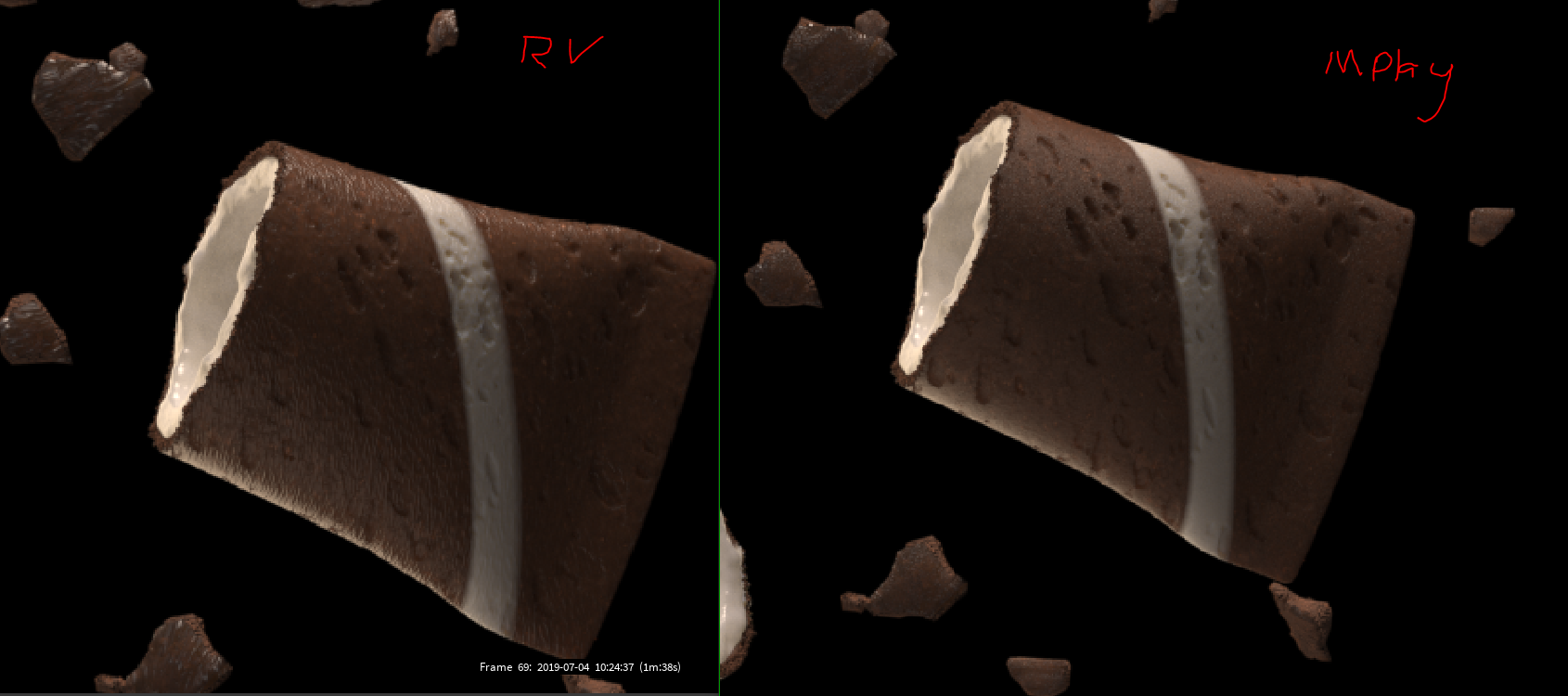
heck, redshift issue. Redshifts RenderView is producing different results to images rendered to disk or mplay.
its like the displacment/bump changes. These area both gamma 2.2
what the heck does this mean `Found conflicting usage types for vertex stream ‘ns’! Original usage is ‘Unspecified’, while another shader is using it as ‘Unspecified’. Please duplicate or use a different vertex stream and assign separately.`
hitting up the forums: www.redshift3d.com/forums/viewthread/26243/
fixed it, see that link for more info
Attachments in this post:
http://fx-td.com/houdiniandchill/wp-content/uploads/discord/20191907/04/19/unknown.png
and that happens on the RV as well?
if you press h or v
weird
for RS https://vimeo.com/341562345?ref=fb-share&1&fbclid=IwAR3RWcVsF9Q-iF88d_Y-lMJQ2bmD95SOCOxG4GBu7Kyj0MCfKZUO88v67E0